15 KiB
BMad Method Scale Adaptive System
Automatically adapts workflows to project complexity - from quick fixes to enterprise systems
Overview
The Scale Adaptive System intelligently routes projects to the right planning methodology based on complexity, not arbitrary story counts.
The Problem
Traditional methodologies apply the same process to every project:
- Bug fix requires full design docs
- Enterprise system built with minimal planning
- One-size-fits-none approach
The Solution
BMad Method adapts to three distinct planning tracks:
- Quick Flow: Tech-spec only, implement immediately
- BMad Method: PRD + Architecture, structured approach
- Enterprise Method: Full planning with security/devops/test
Result: Right planning depth for every project.
Quick Reference
Three Tracks at a Glance
| Track | Planning Depth | Time Investment | Best For |
|---|---|---|---|
| Quick Flow | Tech-spec only | Hours to 1 day | Simple features, bug fixes, clear scope |
| BMad Method | PRD + Arch + UX | 1-3 days | Products, platforms, complex features |
| Enterprise Method | Method + Test/Sec/Ops | 3-7 days | Enterprise needs, compliance, multi-tenant |
Decision Tree
flowchart TD
    START{Describe your project}

    START -->|Bug fix, simple feature| Q1{Scope crystal clear?}
    START -->|Product, platform, complex| M[BMad Method<br/>PRD + Architecture]
    START -->|Enterprise, compliance| E[Enterprise Method<br/>Extended Planning]

    Q1 -->|Yes| QF[Quick Flow<br/>Tech-spec only]
    Q1 -->|Uncertain| M

    style QF fill:#bfb,stroke:#333,stroke-width:2px,color:#000
    style M fill:#bbf,stroke:#333,stroke-width:2px,color:#000
    style E fill:#f9f,stroke:#333,stroke-width:2px,color:#000
Quick Keywords
- Quick Flow: fix, bug, simple, add, clear scope
- BMad Method: product, platform, dashboard, complex, multiple features
- Enterprise Method: enterprise, multi-tenant, compliance, security, audit
How Track Selection Works
When you run workflow-init, it guides you through an educational choice:
1. Description Analysis
Analyzes your project description for complexity indicators and suggests an appropriate track.
2. Educational Presentation
Shows all three tracks with:
- Time investment
- Planning approach
- Benefits and trade-offs
- AI agent support level
- Concrete examples
3. Honest Recommendation
Provides tailored recommendation based on:
- Complexity keywords
- Greenfield vs brownfield
- User's description
4. User Choice
You choose the track that fits your situation. The system guides but never forces.
Example:
workflow-init: "Based on 'Add user dashboard with analytics', I recommend BMad Method.
               This involves multiple features and system design. The PRD + Architecture
               gives AI agents complete context for better code generation."

You: "Actually, this is simpler than it sounds. Quick Flow."

workflow-init: "Got it! Using Quick Flow with tech-spec."
The Three Tracks
Track 1: Quick Flow
Definition: Fast implementation with tech-spec planning.
Time: Hours to 1 day of planning
Planning Docs:
- Tech-spec.md (implementation-focused)
- Story files (1-15 typically, auto-detects epic structure)
Workflow Path:
(Brownfield: document-project first if needed)
↓
Tech-Spec → Implement
Use For:
- Bug fixes
- Simple features
- Enhancements with clear scope
- Quick additions
Story Count: Typically 1-15 stories (guidance, not rule)
Example: "Fix authentication token expiration bug"
AI Agent Support: Basic - minimal context provided
Trade-off: Less planning = higher rework risk if complexity emerges
Track 2: BMad Method (RECOMMENDED)
Definition: Full product + system design planning.
Time: 1-3 days of planning
Planning Docs:
- PRD.md (functional and non-functional requirements)
- Architecture.md (system design)
- UX Design (if UI components)
- Epics and Stories (created after architecture)
Workflow Path:
(Brownfield: document-project first if needed)
↓
(Optional: Analysis phase - brainstorm, research, product brief)
↓
PRD → (Optional UX) → Architecture → Create Epics and Stories → Implementation Readiness Check → Implement
Complete Workflow Visualization:
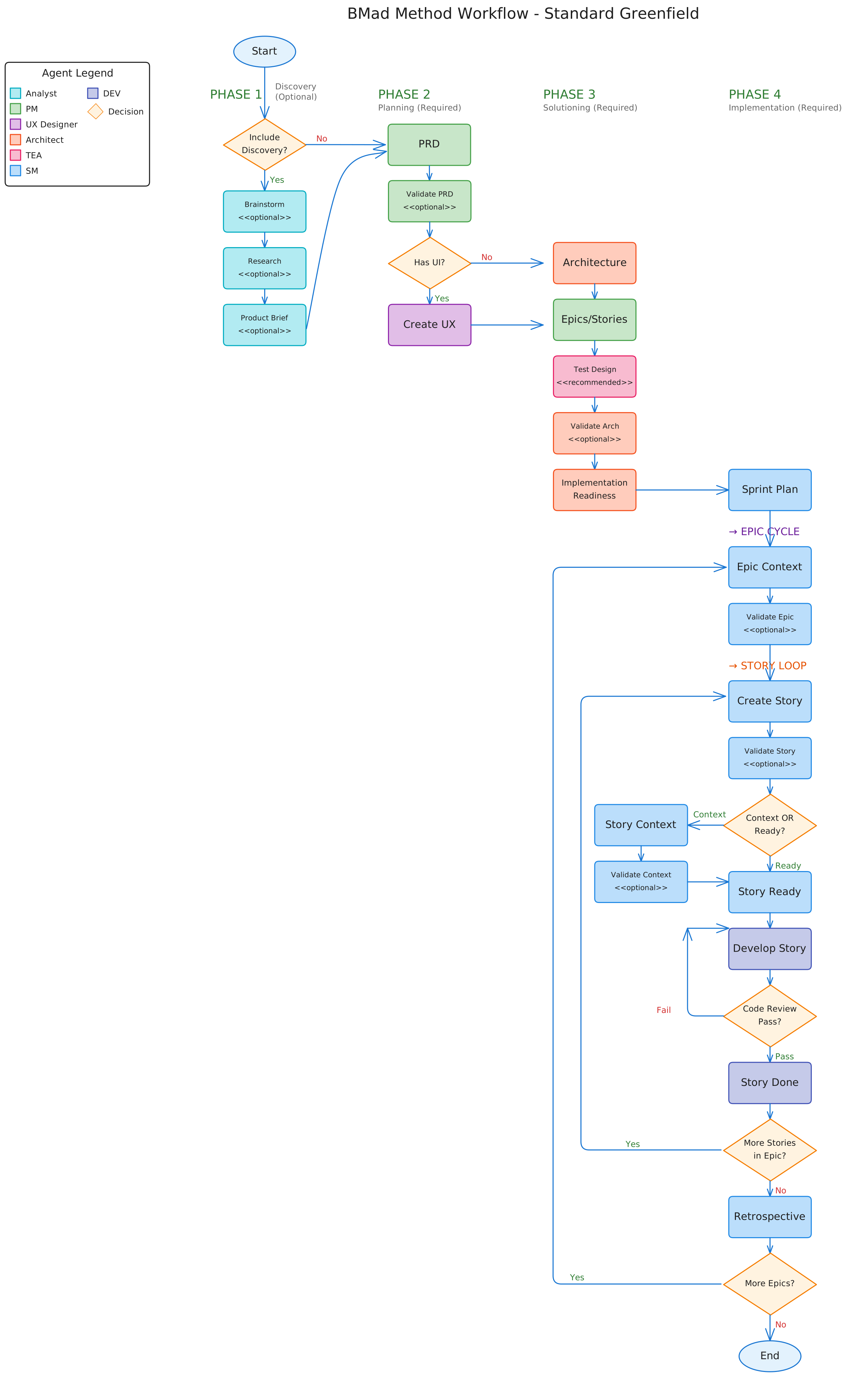
Detailed flowchart showing all phases, workflows, agents (color-coded), and decision points for the BMad Method track. Each colored box represents a different agent role.
Use For:
Greenfield:
- Products
- Platforms
- Multi-feature initiatives
Brownfield:
- Complex additions (new UIs + APIs)
- Major refactors
- New modules
Story Count: Typically 10-50+ stories (guidance, not rule)
Examples:
- "User dashboard with analytics and preferences"
- "Add real-time collaboration to existing document editor"
- "Payment integration system"
AI Agent Support: Exceptional - complete context for coding partnership
Why Architecture for Brownfield?
Your brownfield documentation might be huge. Architecture workflow distills massive codebase context into a focused solution design specific to YOUR project. This keeps AI agents focused without getting lost in existing code.
Benefits:
- Complete AI agent context
- Prevents architectural drift
- Fewer surprises during implementation
- Better code quality
- Faster overall delivery (planning pays off)
Track 3: Enterprise Method
Definition: Extended planning with security, devops, and test strategy.
Time: 3-7 days of planning
Planning Docs:
- All BMad Method docs PLUS:
- Security Architecture
- DevOps Strategy
- Test Strategy
- Compliance documentation
Workflow Path:
(Brownfield: document-project nearly mandatory)
↓
Analysis (recommended/required) → PRD → UX → Architecture
↓
Create Epics and Stories
↓
Security Architecture → DevOps Strategy → Test Strategy
↓
Implementation Readiness Check → Implement
Use For:
- Enterprise requirements
- Multi-tenant systems
- Compliance needs (HIPAA, SOC2, etc.)
- Mission-critical systems
- Security-sensitive applications
Story Count: Typically 30+ stories (but defined by enterprise needs, not count)
Examples:
- "Multi-tenant SaaS platform"
- "HIPAA-compliant patient portal"
- "Add SOC2 audit logging to enterprise app"
AI Agent Support: Elite - comprehensive enterprise planning
Critical for Enterprise:
- Security architecture and threat modeling
- DevOps pipeline planning
- Comprehensive test strategy
- Risk assessment
- Compliance mapping
Planning Documents by Track
Quick Flow Documents
Created: Upfront in Planning Phase
Tech-Spec:
- Problem statement and solution
- Source tree changes
- Technical implementation details
- Detected stack and conventions (brownfield)
- UX/UI considerations (if user-facing)
- Testing strategy
Serves as: Complete planning document (replaces PRD + Architecture)
BMad Method Documents
Created: Upfront in Planning and Solutioning Phases
PRD (Product Requirements Document):
- Product vision and goals
- Functional requirements (FRs)
- Non-functional requirements (NFRs)
- Success criteria
- User experience considerations
- Business context
Note: Epics and stories are created AFTER architecture in the create-epics-and-stories workflow
Architecture Document:
- System components and responsibilities
- Data models and schemas
- Integration patterns
- Security architecture
- Performance considerations
- Deployment architecture
For Brownfield: Acts as focused "solution design" that distills existing codebase into integration plan
Enterprise Method Documents
Created: Extended planning across multiple phases
Includes all BMad Method documents PLUS:
Security Architecture:
- Threat modeling
- Authentication/authorization design
- Data protection strategy
- Audit requirements
DevOps Strategy:
- CI/CD pipeline design
- Infrastructure architecture
- Monitoring and alerting
- Disaster recovery
Test Strategy:
- Test approach and coverage
- Automation strategy
- Quality gates
- Performance testing
Workflow Comparison
| Track | Analysis | Planning | Architecture | Security/Ops | Typical Stories |
|---|---|---|---|---|---|
| Quick Flow | Optional | Tech-spec | None | None | 1-15 |
| BMad Method | Recommended | PRD + UX | Required | None | 10-50+ |
| Enterprise | Required | PRD + UX | Required | Required | 30+ |
Note: Story counts are GUIDANCE based on typical usage, NOT definitions of tracks.
Brownfield Projects
Critical First Step
For ALL brownfield projects: Run document-project BEFORE planning workflows.
Why document-project is Critical
Quick Flow uses it for:
- Auto-detecting existing patterns
- Understanding codebase structure
- Confirming conventions
BMad Method uses it for:
- Architecture inputs (existing structure)
- Integration design
- Pattern consistency
Enterprise Method uses it for:
- Security analysis
- Integration architecture
- Risk assessment
Brownfield Workflow Pattern
flowchart TD
    START([Brownfield Project])
    CHECK{Has docs/<br/>index.md?}

    START --> CHECK
    CHECK -->|No| DOC[document-project workflow<br/>10-30 min]
    CHECK -->|Yes| TRACK[Choose Track]

    DOC --> TRACK
    TRACK -->|Quick| QF[Tech-Spec]
    TRACK -->|Method| M[PRD + Arch]
    TRACK -->|Enterprise| E[PRD + Arch + Sec/Ops]

    style DOC fill:#ffb,stroke:#333,stroke-width:2px,color:#000
    style TRACK fill:#bfb,stroke:#333,stroke-width:2px,color:#000
Common Scenarios
Scenario 1: Bug Fix (Quick Flow)
Input: "Fix email validation bug in login form"
Detection: Keywords "fix", "bug"
Track: Quick Flow
Workflow:
- (Optional) Brief analysis
- Tech-spec with single story
- Implement immediately
Time: 2-4 hours total
Scenario 2: Small Feature (Quick Flow)
Input: "Add OAuth social login (Google, GitHub, Facebook)"
Detection: Keywords "add", "feature", clear scope
Track: Quick Flow
Workflow:
- (Optional) Research OAuth providers
- Tech-spec with 3 stories
- Implement story-by-story
Time: 1-3 days
Scenario 3: Customer Portal (BMad Method)
Input: "Build customer portal with dashboard, tickets, billing"
Detection: Keywords "portal", "dashboard", multiple features
Track: BMad Method
Workflow:
- (Recommended) Product Brief
- PRD (FRs/NFRs)
- (If UI) UX Design
- Architecture (system design)
- Create Epics and Stories
- Implementation Readiness Check
- Implement with sprint planning
Time: 1-2 weeks
Scenario 4: E-commerce Platform (BMad Method)
Input: "Build e-commerce platform with products, cart, checkout, admin, analytics"
Detection: Keywords "platform", multiple subsystems
Track: BMad Method
Workflow:
- Research + Product Brief
- Comprehensive PRD (FRs/NFRs)
- UX Design (recommended)
- System Architecture (required)
- Create Epics and Stories
- Implementation Readiness Check
- Implement with phased approach
Time: 3-6 weeks
Scenario 5: Brownfield Addition (BMad Method)
Input: "Add search functionality to existing product catalog"
Detection: Brownfield + moderate complexity
Track: BMad Method (not Quick Flow)
Critical First Step:
- Run document-project to analyze existing codebase
Then Workflow:
- PRD for search feature (FRs/NFRs)
- Architecture (integration design - highly recommended)
- Create Epics and Stories
- Implementation Readiness Check
- Implement following existing patterns
Time: 1-2 weeks
Why Method not Quick Flow?: Integration with existing catalog system benefits from architecture planning to ensure consistency.
Scenario 6: Multi-tenant Platform (Enterprise Method)
Input: "Add multi-tenancy to existing single-tenant SaaS platform"
Detection: Keywords "multi-tenant", enterprise scale
Track: Enterprise Method
Workflow:
- Document-project (mandatory)
- Research (compliance, security)
- PRD (multi-tenancy requirements - FRs/NFRs)
- Architecture (tenant isolation design)
- Create Epics and Stories
- Security Architecture (data isolation, auth)
- DevOps Strategy (tenant provisioning, monitoring)
- Test Strategy (tenant isolation testing)
- Implementation Readiness Check
- Phased implementation
Time: 3-6 months
Best Practices
1. Document-Project First for Brownfield
Always run document-project before starting brownfield planning. AI agents need existing codebase context.
2. Trust the Recommendation
If workflow-init suggests BMad Method, there's probably complexity you haven't considered. Review carefully before overriding.
3. Start Smaller if Uncertain
Uncertain between Quick Flow and Method? Start with Quick Flow. You can create PRD later if needed.
4. Don't Skip Implementation Readiness Check
For BMad Method and Enterprise, implementation readiness checks prevent costly mistakes. Invest the time.
5. Architecture is Optional but Recommended for Brownfield
Brownfield BMad Method makes architecture optional, but it's highly recommended. It distills complex codebase into focused solution design.
6. Discovery Phase Based on Need
Brainstorming and research are offered regardless of track. Use them when you need to think through the problem space.
7. Product Brief for Greenfield Method
Product Brief is only offered for greenfield BMad Method and Enterprise. It's optional but helps with strategic thinking.
Key Differences from Legacy System
Old System (Levels 0-4)
- Arbitrary story count thresholds
- Level 2 vs Level 3 based on story count
- Confusing overlap zones (5-10 stories, 12-40 stories)
- Tech-spec and PRD shown as conflicting options
New System (3 Tracks)
- Methodology-based distinction (not story counts)
- Story counts as guidance, not definitions
- Clear track purposes:
- Quick Flow = Implementation-focused
- BMad Method = Product + system design
- Enterprise = Extended with security/ops
- Mutually exclusive paths chosen upfront
- Educational decision-making
Migration from Old System
If you have existing projects using the old level system:
- Level 0-1 → Quick Flow
- Level 2-3 → BMad Method
- Level 4 → Enterprise Method
Run workflow-init on existing projects to migrate to new tracking system. It detects existing planning artifacts and creates appropriate workflow tracking.
Related Documentation
- Quick Start Guide - Get started with BMM
- Quick Spec Flow - Details on Quick Flow track
- Brownfield Guide - Existing codebase workflows
- Glossary - Complete terminology
- FAQ - Common questions
- Workflows Guide - Complete workflow reference
Scale Adaptive System - Right planning depth for every project.