12 KiB
BMM Implementation Workflows (Phase 4)
Reading Time: ~8 minutes
Overview
Phase 4 (Implementation) workflows manage the iterative sprint-based development cycle using a story-centric workflow where each story moves through a defined lifecycle from creation to completion.
Key principle: One story at a time, move it through the entire lifecycle before starting the next.
Complete Workflow Context
Phase 4 is the final phase of the BMad Method workflow. To see how implementation fits into the complete methodology:
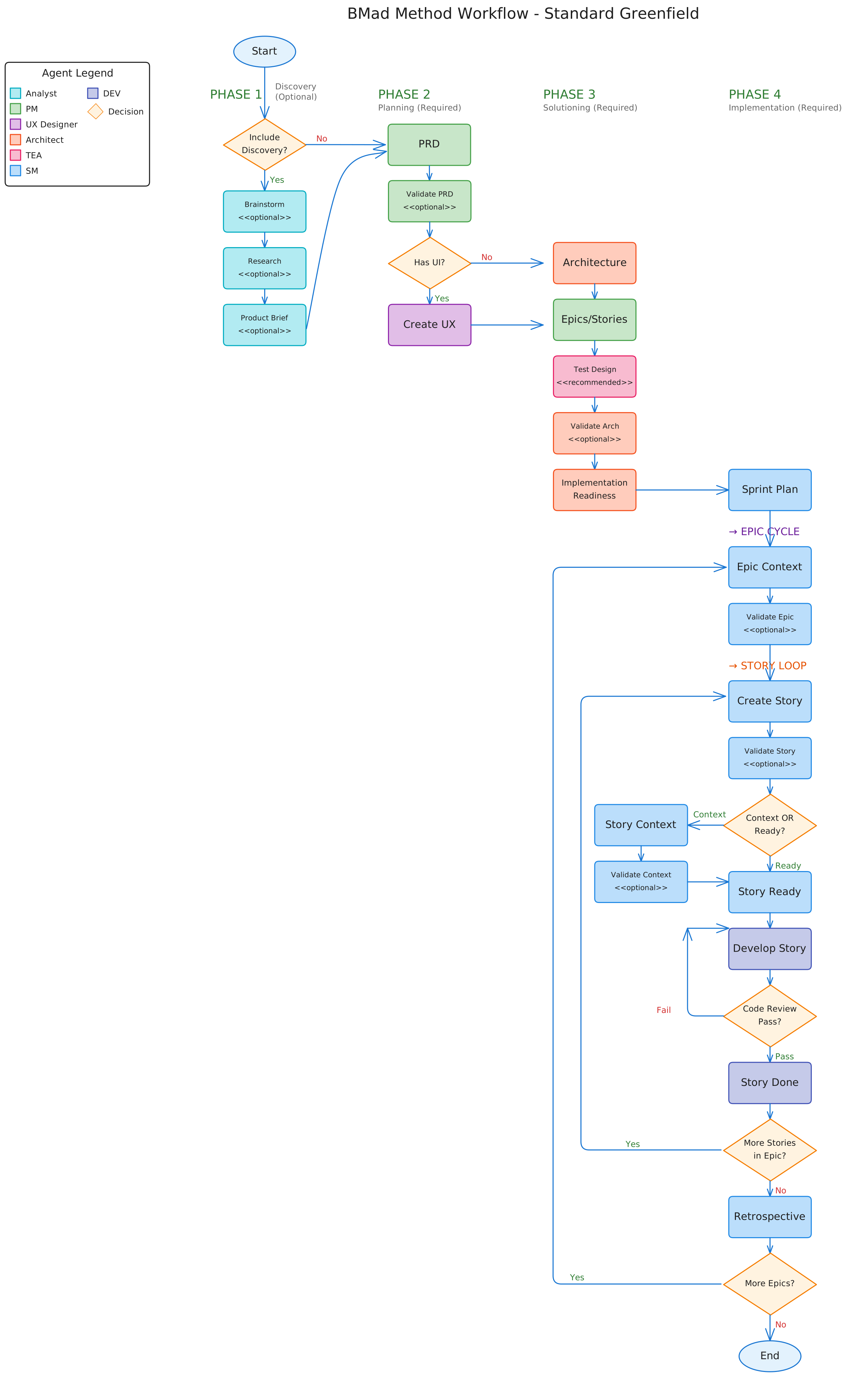
Complete workflow showing Phases 1-4. Phase 4 (Implementation) is the rightmost column, showing the iterative epic and story cycles detailed below.
Phase 4 Workflow Lifecycle
%%{init: {'theme':'base', 'themeVariables': { 'primaryColor':'#fff','primaryTextColor':'#000','primaryBorderColor':'#000','lineColor':'#000','fontSize':'16px','fontFamily':'arial'}}}%%
graph TB
    subgraph Setup["<b>SPRINT SETUP - Run Once</b>"]
        direction TB
        SprintPlanning["<b>SM: sprint-planning</b><br/>Initialize sprint status file"]
    end

    subgraph EpicCycle["<b>EPIC CYCLE - Repeat Per Epic</b>"]
        direction TB
        EpicContext["<b>SM: epic-tech-context</b><br/>Generate epic technical guidance"]
        ValidateEpic["<b>SM: validate-epic-tech-context</b><br/>(Optional validation)"]

        EpicContext -.->|Optional| ValidateEpic
        ValidateEpic -.-> StoryLoopStart
        EpicContext --> StoryLoopStart[Start Story Loop]
    end

    subgraph StoryLoop["<b>STORY LIFECYCLE - Repeat Per Story</b>"]
        direction TB

        CreateStory["<b>SM: create-story</b><br/>Create next story from queue"]
        ValidateStory["<b>SM: validate-create-story</b><br/>(Optional validation)"]
        StoryContext["<b>SM: story-context</b><br/>Assemble dynamic context"]
        StoryReady["<b>SM: story-ready-for-dev</b><br/>Mark ready without context"]
        ValidateContext["<b>SM: validate-story-context</b><br/>(Optional validation)"]
        DevStory["<b>DEV: develop-story</b><br/>Implement with tests"]
        CodeReview["<b>DEV: code-review</b><br/>Senior dev review"]
        StoryDone["<b>DEV: story-done</b><br/>Mark complete, advance queue"]

        CreateStory -.->|Optional| ValidateStory
        ValidateStory -.-> StoryContext
        CreateStory --> StoryContext
        CreateStory -.->|Alternative| StoryReady
        StoryContext -.->|Optional| ValidateContext
        ValidateContext -.-> DevStory
        StoryContext --> DevStory
        StoryReady -.-> DevStory
        DevStory --> CodeReview
        CodeReview -.->|Needs fixes| DevStory
        CodeReview --> StoryDone
        StoryDone -.->|Next story| CreateStory
    end

    subgraph EpicClose["<b>EPIC COMPLETION</b>"]
        direction TB
        Retrospective["<b>SM: epic-retrospective</b><br/>Post-epic lessons learned"]
    end

    subgraph Support["<b>SUPPORTING WORKFLOWS</b>"]
        direction TB
        CorrectCourse["<b>SM: correct-course</b><br/>Handle mid-sprint changes"]
        WorkflowStatus["<b>Any Agent: workflow-status</b><br/>Check what's next"]
    end

    Setup --> EpicCycle
    EpicCycle --> StoryLoop
    StoryLoop --> EpicClose
    EpicClose -.->|Next epic| EpicCycle
    StoryLoop -.->|If issues arise| CorrectCourse
    StoryLoop -.->|Anytime| WorkflowStatus
    EpicCycle -.->|Anytime| WorkflowStatus

    style Setup fill:#e3f2fd,stroke:#1565c0,stroke-width:3px,color:#000
    style EpicCycle fill:#c5e1a5,stroke:#33691e,stroke-width:3px,color:#000
    style StoryLoop fill:#f3e5f5,stroke:#6a1b9a,stroke-width:3px,color:#000
    style EpicClose fill:#ffcc80,stroke:#e65100,stroke-width:3px,color:#000
    style Support fill:#fff3e0,stroke:#e65100,stroke-width:3px,color:#000

    style SprintPlanning fill:#90caf9,stroke:#0d47a1,stroke-width:2px,color:#000
    style EpicContext fill:#aed581,stroke:#1b5e20,stroke-width:2px,color:#000
    style ValidateEpic fill:#c5e1a5,stroke:#33691e,stroke-width:1px,color:#000
    style CreateStory fill:#ce93d8,stroke:#4a148c,stroke-width:2px,color:#000
    style ValidateStory fill:#e1bee7,stroke:#6a1b9a,stroke-width:1px,color:#000
    style StoryContext fill:#ce93d8,stroke:#4a148c,stroke-width:2px,color:#000
    style StoryReady fill:#ce93d8,stroke:#4a148c,stroke-width:2px,color:#000
    style ValidateContext fill:#e1bee7,stroke:#6a1b9a,stroke-width:1px,color:#000
    style DevStory fill:#a5d6a7,stroke:#1b5e20,stroke-width:2px,color:#000
    style CodeReview fill:#a5d6a7,stroke:#1b5e20,stroke-width:2px,color:#000
    style StoryDone fill:#a5d6a7,stroke:#1b5e20,stroke-width:2px,color:#000
    style Retrospective fill:#ffb74d,stroke:#e65100,stroke-width:2px,color:#000
Quick Reference
| Workflow | Agent | When | Purpose |
|---|---|---|---|
| sprint-planning | SM | Once at Phase 4 start | Initialize sprint tracking file |
| epic-tech-context | SM | Per epic | Generate epic-specific technical guidance |
| validate-epic-tech-context | SM | Optional after epic-tech-context | Validate tech spec against checklist |
| create-story | SM | Per story | Create next story from epic backlog |
| validate-create-story | SM | Optional after create-story | Independent validation of story draft |
| story-context | SM | Optional per story | Assemble dynamic story context XML |
| validate-story-context | SM | Optional after story-context | Validate story context against checklist |
| story-ready-for-dev | SM | Optional per story | Mark story ready without generating context |
| develop-story | DEV | Per story | Implement story with tests |
| code-review | DEV | Per story | Senior dev quality review |
| story-done | DEV | Per story | Mark complete and advance queue |
| epic-retrospective | SM | After epic complete | Review lessons and extract insights |
| correct-course | SM | When issues arise | Handle significant mid-sprint changes |
| workflow-status | Any | Anytime | Check "what should I do now?" |
Agent Roles
SM (Scrum Master) - Primary Implementation Orchestrator
Workflows: sprint-planning, epic-tech-context, validate-epic-tech-context, create-story, validate-create-story, story-context, validate-story-context, story-ready-for-dev, epic-retrospective, correct-course
Responsibilities:
- Initialize and maintain sprint tracking
- Generate technical context (epic and story level)
- Orchestrate story lifecycle with optional validations
- Mark stories ready for development
- Handle course corrections
- Facilitate retrospectives
DEV (Developer) - Implementation and Quality
Workflows: develop-story, code-review, story-done
Responsibilities:
- Implement stories with tests
- Perform senior developer code reviews
- Mark stories complete and advance queue
- Ensure quality and adherence to standards
Story Lifecycle States
Stories move through these states in the sprint status file:
- TODO - Story identified but not started
- IN PROGRESS - Story being implemented (create-story → story-context → dev-story)
- READY FOR REVIEW - Implementation complete, awaiting code review
- DONE - Accepted and complete
Typical Sprint Flow
Sprint 0 (Planning Phase)
- Complete Phases 1-3 (Analysis, Planning, Solutioning)
- PRD/GDD + Architecture complete
- V6: Epics+Stories created via create-epics-and-stories workflow (runs AFTER architecture)
Sprint 1+ (Implementation Phase)
Start of Phase 4:
- SM runs
sprint-planning(once)
Per Epic:
- SM runs
epic-tech-context - SM optionally runs
validate-epic-tech-context
Per Story (repeat until epic complete):
- SM runs
create-story - SM optionally runs
validate-create-story - SM runs
story-contextORstory-ready-for-dev(choose one) - SM optionally runs
validate-story-context(if story-context was used) - DEV runs
develop-story - DEV runs
code-review - If code review passes: DEV runs
story-done - If code review finds issues: DEV fixes in
develop-story, then back to code-review
After Epic Complete:
- SM runs
epic-retrospective - Move to next epic (start with
epic-tech-contextagain)
As Needed:
- Run
workflow-statusanytime to check progress - Run
correct-courseif significant changes needed
Key Principles
One Story at a Time
Complete each story's full lifecycle before starting the next. This prevents context switching and ensures quality.
Epic-Level Technical Context
Generate detailed technical guidance per epic (not per story) using epic-tech-context. This provides just-in-time architecture without upfront over-planning.
Story Context (Optional)
Use story-context to assemble focused context XML for each story, pulling from PRD, architecture, epic context, and codebase docs. Alternatively, use story-ready-for-dev to mark a story ready without generating context XML.
Quality Gates
Every story goes through code-review before being marked done. No exceptions.
Continuous Tracking
The sprint-status.yaml file is the single source of truth for all implementation progress.
Common Patterns
Level 0-1 (Quick Flow)
tech-spec (PM)
  → sprint-planning (SM)
  → story loop (SM/DEV)
Level 2-4 (BMad Method / Enterprise)
PRD (PM) → Architecture (Architect)
  → create-epics-and-stories (PM)  ← V6: After architecture!
  → implementation-readiness (Architect)
  → sprint-planning (SM, once)
  → [Per Epic]:
      epic-tech-context (SM)
      → story loop (SM/DEV)
      → epic-retrospective (SM)
  → [Next Epic]
Related Documentation
- Phase 2: Planning Workflows
- Phase 3: Solutioning Workflows
- Quick Spec Flow - Level 0-1 fast track
- Scale Adaptive System - Understanding project levels
Troubleshooting
Q: Which workflow should I run next?
A: Run workflow-status - it reads the sprint status file and tells you exactly what to do.
Q: Story needs significant changes mid-implementation?
A: Run correct-course to analyze impact and route appropriately.
Q: Do I run epic-tech-context for every story?
A: No! Run once per epic, not per story. Use story-context or story-ready-for-dev per story instead.
Q: Do I have to use story-context for every story?
A: No, it's optional. You can use story-ready-for-dev to mark a story ready without generating context XML.
Q: Can I work on multiple stories in parallel? A: Not recommended. Complete one story's full lifecycle before starting the next. Prevents context switching and ensures quality.
Q: What if code review finds issues?
A: DEV runs develop-story to make fixes, re-runs tests, then runs code-review again until it passes.
Q: When do I run validations? A: Validations are optional quality gates. Use them when you want independent review of epic tech specs, story drafts, or story context before proceeding.
Phase 4 Implementation - One story at a time, done right.